
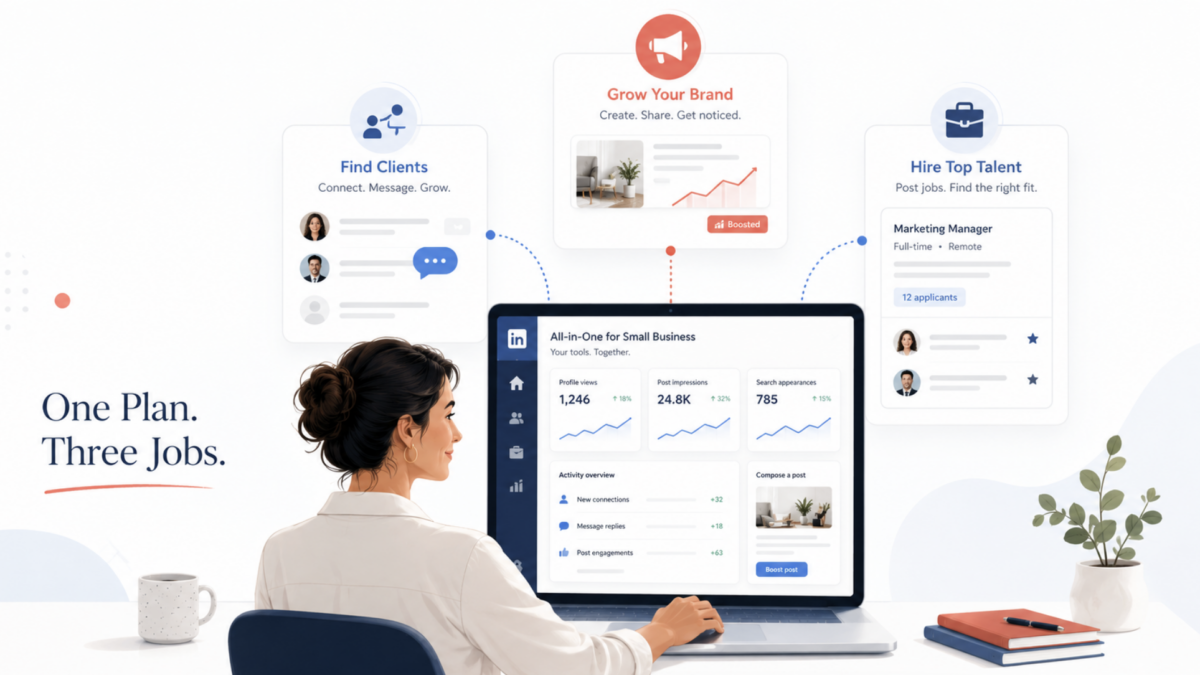
LinkedIn has done something worth paying attention to. Instead of adding another feature to an existing subscription tier, the platform has quietly built an entirely new plan category designed specifically for small business owners who are trying to do three things at once: find clients, build a brand presence, and hire people when the time comes.
The plan is called Premium All-in-One, and it bundles what previously required two separate subscriptions (a personal profile upgrade and a Company Page plan) into a single monthly payment. At $89.99 per month (or $899.88 annually), it pitches itself as the all-purpose LinkedIn solution for the business owner who wears every hat.
That pitch is worth examining closely. Because there is a real difference between a plan that genuinely saves you time and money, and one that charges a premium for features you already have or would never use. This article breaks down exactly what you get, who it actually makes sense for, and what questions you should ask before you hand over your credit card details.
What LinkedIn Changed, and Why It Matters Now
LinkedIn’s earlier plans were built around single functions. Premium Business helped you network and prospect. A Company Page subscription helped you grow your brand’s presence with follower tools and analytics. If you wanted both, you paid for both. That was a problem for small business owners running lean operations, where the founder is often also the sales person, the marketer, and the hiring manager all at once.
Premium All-in-One acknowledges that reality. It collapses those separate tools into one dashboard, adds a layer of AI-powered guidance, and wraps it with monthly advertising and hiring credits that partially offset the subscription cost. This is not just a repackaging exercise. The centralized dashboard, which LinkedIn calls your Premium hub, is genuinely new, designed to show you recommended next actions across selling, marketing, and recruiting from a single screen.
The plan is still rolling out globally, which means not every LinkedIn user will see it in their account yet. If you do not see the All-in-One option when you navigate to LinkedIn Premium, it is still coming to your account.
What Is Actually Included
Here is a clear breakdown of what you get with Premium All-in-One, in plain terms.
For finding and reaching new clients
The plan gives you 30 InMail credits per month. InMail lets you message any LinkedIn user directly, even if you are not connected. According to LinkedIn’s own data, InMail messages generate a 4.6x higher response rate than cold email. Thirty credits is a meaningful number for a small business doing targeted outreach.
You also get daily prospect suggestions, up to 15 each day, based on your target criteria. Think of it as a lightweight version of what Sales Navigator does, surfacing potential clients without requiring you to run searches manually. The plan also includes unlimited search with advanced filters, letting you narrow by job function, seniority, location, company size, and years of experience.
Real-time company insights are included as well, giving you visibility into recent changes at a prospect’s business, including team expansions, leadership changes, and funding news, so you can personalize your outreach instead of sending the same message to everyone.
For marketing and building your presence
You receive $50 per month in post boost credits. This lets you amplify your best-performing posts as sponsored content, reaching people beyond your current network. For a small business with a growing LinkedIn following, this is a practical tool for accelerating reach without committing to a full LinkedIn Ads campaign.
The plan also lets you highlight your business directly on your personal profile, auto-invite people who engage with your content to follow you, and access a curated feed of trending posts from your target prospects so you can engage where the right conversations are already happening.
For hiring
You get a monthly job posting credit that can be used to promote open roles and attract more qualified applicants. This is not a full recruiting solution. It does not give you Recruiter Lite or anything close to it. But for a small business that hires occasionally rather than continuously, it removes the friction of paying separately each time you post a role.
For workflow and guidance
A centralized dashboard pulls your sales, marketing, and hiring activity into one place. LinkedIn layers in AI-powered recommendations that tell you what to do next based on your goals and usage patterns. Think of it as a simplified business intelligence layer that nudges you toward the actions most likely to move the needle.
The Honest Numbers: Is the Value Real?
The subscription costs $89.99 per month. But the monthly credits soften that number considerably.
You receive $50 in post boost credits and a job posting credit whose value varies depending on how competitive your role and location are, typically between $25 and $75 per promoted post. If you use both credits each month, you are getting $75 to $125 in advertising value included in a $90 subscription. For a business already spending money on LinkedIn promotions or job posts, the math can work in your favor.
The 30 InMail credits alone, if purchased through a lower-tier plan, would require a Sales Navigator Core subscription at $119.99 per month. You are getting a version of that outreach capability here at a lower price point, though with meaningfully less prospecting depth than Sales Navigator offers.
Annual billing drops the effective cost to roughly $75 per month (17% savings), which makes the value calculation more favorable if you are confident in the fit before committing.
Who This Plan Is Right For
Be honest with yourself here. Premium All-in-One makes genuine sense for a specific profile of small business owner, and not for everyone.
It works well for service businesses actively prospecting on LinkedIn. Consultants, coaches, freelance professionals, marketing agencies, accountants, lawyers, recruiters, and other service providers who use LinkedIn as a primary business development channel will find the InMail credits, prospect suggestions, and profile visibility tools directly useful. If LinkedIn is already part of how you find clients, this plan consolidates your toolkit and adds reach.
It works for founders and solo operators managing everything themselves. If you are the person responsible for sales, content, and hiring, having those tools in one place genuinely reduces context-switching. The centralized dashboard is built for the person who does not have a marketing team, a sales team, or an HR department.
It works if you promote content and post jobs occasionally. The built-in credits make sense if you already spend money on LinkedIn promotions or post roles a few times a year. The credits do not roll over month to month, so you need to actually use them.
Who Should Skip It
A plan being well-designed does not mean it is the right fit for every business. Be cautious if you fall into any of these categories.
Local B2C businesses. If you run a restaurant, salon, gym, retail shop, or any business where customers find you through Google Maps, Instagram, or foot traffic rather than LinkedIn, this plan will not move the needle for you. LinkedIn’s audience skews heavily professional and B2B. The tools here are built for service businesses and professional outreach, not consumer discovery.
Businesses that only need one function. If you only need to grow your Company Page, LinkedIn’s standalone Premium Company Page plan is cheaper and more focused. If you only need serious prospecting depth, Sales Navigator Core at $119.99 per month gives you far more robust filtering, lead lists, and CRM integrations than All-in-One provides. Do not pay for a bundle when a single tool serves your needs more precisely.
Businesses not yet active on LinkedIn. If your LinkedIn presence is minimal (inconsistent posting, few connections, a bare-bones profile), the tools in this plan will underperform. InMail is powerful when it is backed by a credible profile. Post boost credits generate better returns when you already have an engaged base. Build the foundation first, then consider upgrading.
How to Get the Most Out of It If You Subscribe
If you decide Premium All-in-One is the right move, approach it with a plan rather than treating it as a passive upgrade.
Start by optimizing your profile and Company Page before anything else. The AI-powered recommendations LinkedIn surfaces are only as useful as the information you give the algorithm to work with. Make sure your headline, about section, and featured content clearly communicate what you do and who you serve.
Use your InMail credits strategically, not broadly. Send fewer, better messages. Use the real-time insights the plan provides, including recent company changes, mutual connections, and shared interests, to personalize each outreach. Thirty credits go further when every message is relevant.
Set a reminder to use your boost and hiring credits each month. They expire if unused. Even if you do not have a major post to promote, boosting a high-performing piece of content from the previous month is a reasonable way to keep the value working for you.
Track what the plan is actually generating for your business. If InMail responses are turning into discovery calls, you have a clear ROI signal. If three months pass without measurable business activity from the plan, that is your answer.
Key Takeaways
LinkedIn Premium All-in-One costs $89.99 per month and bundles sales tools, marketing credits, and hiring features into one subscription designed for small business owners. The plan includes 30 InMail credits, 15 daily prospect suggestions, unlimited search, $50 in monthly post boost credits, and a job posting credit.
Monthly credits offset a meaningful portion of the subscription cost if you use them consistently. The plan is strongest for service businesses, consultants, coaches, and solo operators actively using LinkedIn for client development and occasional hiring. B2C local businesses, single-function users, and businesses without an established LinkedIn presence are likely better served by a different plan or no plan at all.
The plan is still rolling out and may not be visible in all accounts yet.
Frequently Asked Questions
How is LinkedIn Premium All-in-One different from Premium Business?
Premium Business costs $59.99 per month and focuses on personal profile features like InMail credits, unlimited browsing, and business insights. All-in-One adds Company Page tools, post boost credits, hiring credits, daily prospect suggestions, and a centralized business dashboard. It is a more complete package at a higher price point.
Can I try it before committing?
Yes. LinkedIn offers a free trial for All-in-One. Check your eligibility directly on the LinkedIn Premium page for small businesses.
Does the plan include LinkedIn Sales Navigator?
No. Sales Navigator is a separate, more advanced product built exclusively for sales professionals. All-in-One gives you a lighter version of prospecting tools, but it does not replace Sales Navigator for businesses doing serious volume outreach or complex pipeline management.
What happens to my unused credits each month?
Credits do not roll over. If you do not use your post boost credit or hiring credit in a given month, they expire. Build a habit of using them monthly to get full value from the subscription.
Is it available everywhere?
LinkedIn is rolling it out progressively. Pricing is confirmed in USD, AUD, CAD, EUR, and GBP. Check your LinkedIn account directly to see if it is available to you yet.
What if my business grows and I need more advanced tools?
LinkedIn’s Sales Navigator, LinkedIn Ads, and Hiring Pro products are purpose-built for businesses at scale. All-in-One is designed as a starting point, not a ceiling. Upgrade to specialized tools when a single function becomes your primary growth lever.


Leave a Reply